Author: morganlefey1119@gmail.com

  • Module 4: Time Series Visualization

    This week, we are working with the Monthly Modal Time Series dataset to create a time series visualization using Tableau Public. After looking at the dataset, I decided to keep the 6 variables:

    1. Primary USA City
    2. Year
    3. Vehicle Revenue Hours
    4. Ridership
    5. Collisions with Motor Vehicle
    6. Collisions with Person. 

    I chose these variables because they allow me to compare collision trends over time and across different cities. I can look at changes over time, city comparisons, differences between collision types, and  additional context about each transit system.

    For my visualization, I decided to focus on collisions with motor vehicles and persons over time, based on city. To do this, after uploading my data in Tableau, I created a dual axis line chart. The columns/x-axis is the year, and the rows/y-axis is the number of vehicle and person collisions, and each is color coded. I also added a filter by city. This allows you to see the average collisions of all cities, a few, or just look at each one individually.  Below is the interactive graph, and on the right hand side you can change the city being displayed.

    Link here.

    Looking at the graph across all cities, the first noticeable thing is that collisions with motor vehicles are generally higher than collisions with persons. This difference can be seen when comparing the two lines on the chart, with vehicle collisions usually having higher totals over time. The two types of collisions do not occur at the same frequency in the dataset.

     The more interesting pattern is the spike in 2018, where both collision types rise sharply and vehicle collisions rise the most, and the sharp drop in 2019. The drop however, might be a  reflection of incomplete data for that year rather than a real decline, so I would be cautious about reading it as a true change in collisions.

    When I looked at the cities individually, a 2018 spike was actually not common. Most cities peaked in other years, some in 2016 or 2017, and others stayed fairly steady with no major spikes at all. The 2018 peak in the combined graph is driven mostly by a few large cities that did spike that year and pulled the total up. 

    New York, for example, records roughly 500 to 900 vehicle collisions and about 100 to nearly 300 person collisions per year, while a small city like Bend, Oregon records only 1 to 5 vehicle collisions and often 0 person collisions. Because the large cities have such high counts, they dominate the overall average graph, so the combined trend mostly reflects what happens in the biggest cities rather than a typical city. It is also important to remember that the chart shows collision counts, not rates. A city with more collisions is not necessarily less safe, since it may simply have more people, more vehicles, and more traffic. This is why looking at cities individually, or a few at a time, is more informative than relying on the overall average.

  • Assignment #3: Analyzing 2016 data “Poll” Data in R

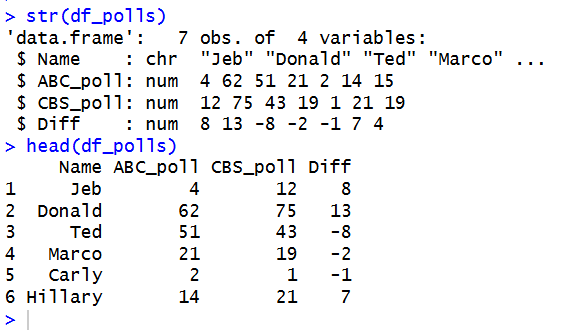
    To analyze ‘poll’ data in R, we start by defining out data, compiling it into a data frame. and then inspecting it:

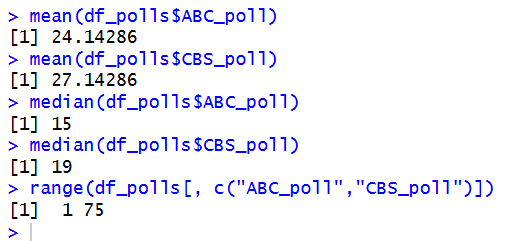
    Then, we find the mean, median, and range of each poll:

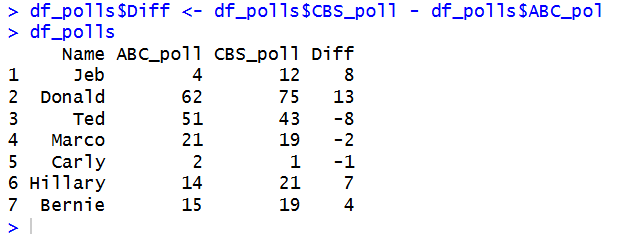
    And add a column for the difference between CBS and ABC:

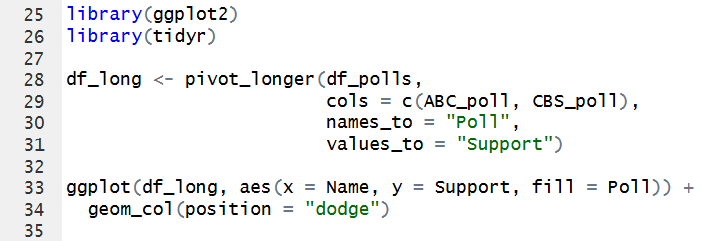
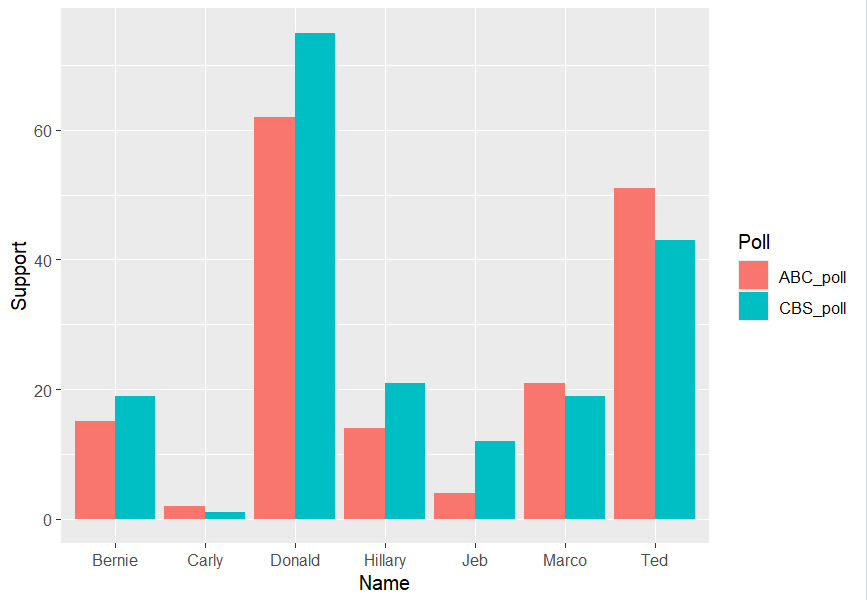
    Finally, we generate a plot to display and visualize the poll results and their differences:

    Looking at the poll data, the biggest differences between the ABC and CBS polls are for Donald, Jeb, and Ted. Donald has the largest difference at 13 points, with 62 in the ABC poll and 75 in the CBS poll. Jeb has a difference of 8 points, while Ted also has a difference of 8 points, but in the opposite direction. We can see that different polls can have noticeably different results for the same candidates.

    Using made up data can be limiting because it cannot lead to real or actual discoveries. It can be useful for showing possible patterns and helping us learn how to analyze data, but it does not provide the details that would come from real observations. To get real polling data, I would look for research organizations that collect and share polling information. Organizations such as the Gallup Poll and Pew Research Center provide real survey and polling data that can be used for analysis. I would also compare data from multiple reliable sources and check how the data was collected to make sure the results are accurate.

    Code chunk:
    Name <- c("Jeb", "Donald", "Ted", "Marco", "Carly", "Hillary", "Bernie")
    ABC_poll <- c( 4, 62, 51, 21, 2, 14, 15)
    CBS_poll <- c( 12, 75, 43, 19, 1, 21, 19)

    df_polls <- data.frame(Name, ABC_poll, CBS_poll)

    str(df_polls)
    head(df_polls)

    mean(df_polls$ABC_poll)
    mean(df_polls$CBS_poll)

    median(df_polls$ABC_poll)
    median(df_polls$CBS_poll)

    range(df_polls[, c("ABC_poll","CBS_poll")])

    df_polls$Diff <- df_polls$CBS_poll - df_polls$ABC_pol
    df_polls

    library(ggplot2)
    library(tidyr)

    df_long <- pivot_longer(df_polls,
    cols = c(ABC_poll, CBS_poll),
    names_to = "Poll",
    values_to = "Support")

    ggplot(df_long, aes(x = Name, y = Support, fill = Poll)) +
    geom_col(position = "dodge")
  • Module # 2 Assignment: Importing Data and Function Evaluation in R

    For this assignment, we are evaluating the myMean function using the vector assignment2, shown below.

    When running  myMean(assignment2), we get the error message:

    The error message states that ‘assignment‘ can not be found. This is because it does not exist! We created assignment2, and since the variable names are different, we must edit myMean to match. This is the same for someData, since we did not create a variable or vector with this name, it does not exist and is not defined. We need to correct the function.

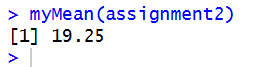
    Now that the variable names are correct, we can run the updated function myMean(assignment2), and get this output:

  • Module 2: My Geographic Map of Florida State Parks

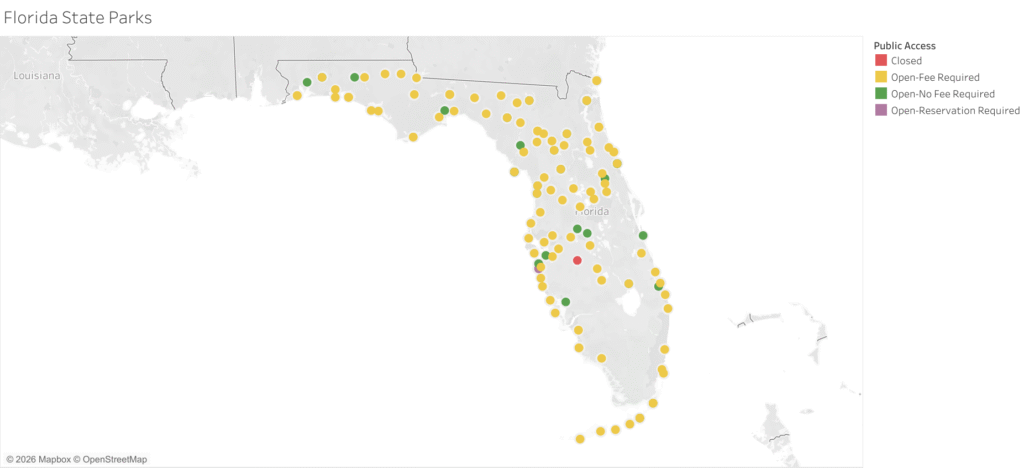
    For this assignment, we are asked to find a dataset and use it to build a map in Tableau. For my dataset, I created a visual for Florida State Parks Boundaries from the platform. 

    As I was creating this visualization, I came across some challenges. First, I had to do some basic tweaking, as my dataset did not include longitude and latitude columns. This meant Tableau had to generate them, leading to it creating 150 separate maps, one for each point. This was simple enough though, and I just had to remove the address data from the mapping column. 

    After fixing this and creating one map, it was only plotting about 10 of the points, instead of all of them. This took me a much longer time to troubleshoot, but it ended up being an easy fix. Tableau was grouping the parks together, so I had to manually split the address data into separate city, state, and ZIP data tables. 

    It was also my first time working with Tableau, so the issues I faced took me longer to solve than they should have, since I am still new to the platform and interface. 


  • Assignment #1: Getting Started with R Programming 

    I already had RStudio installed on my computer, as I have taken courses that use it in the past. Since RStudio was already set up, I did not need to troubleshoot or resolve any installation problems.

    I am using Windows 11, with R version 4.5.1 and the latest version of RStudio, 2026.08.2. 

    Here is a screenshot of my console window, showing my current version:

    In R, a vector stores data sets and is fundamental to programming. Vectors come in different forms, including numeric, logical, and character vectors, among others. They are considered the basic building blocks of data in R and are used to store and work with collections of values. A majority of data manipulation is just interacting with vectors in different ways.

  • Assignment # 1: Data Visualization Analysis

    Recently, I came across this chart. It compares China’s 2025, 2026, and the 10 year average oil imports in millions of barrels per day. After the Strait of Hormuz crisis in March, there was a dramatic decline in their oil imports, cutting over 5.5mb/d (the largest amount any country has ever stopped importing oil!).

    Source: https://www.api.org/energy-insights/charts-analysis/china-crude-imports-have-declined

    I believe this chart was created by a human designer rather than generated by AI. There doesn’t seem to be any obvious logical errors or missing elements, and the chart is based off of real world data. While it is possible that the data was entered into a system and the chart was automatically generated, I believe the underlying data was entered in by a person, and that the chart was either designed, analyzed, or reviewed by a human. It seems more likely to be human created or at least human reviewed rather than fully AI generated.

    I am excited to be a part of this course! I have reviewed the syllabus, and understand the grading system, course structure, and the Visual Peer Review Dashboard process.