Category: LIS4370

  • Assignment #9: Visualization in R – Base Graphics, Lattice, and ggplot2

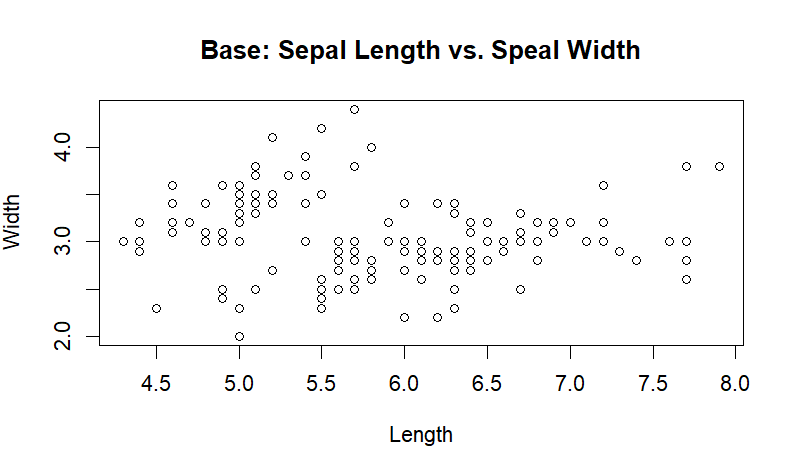
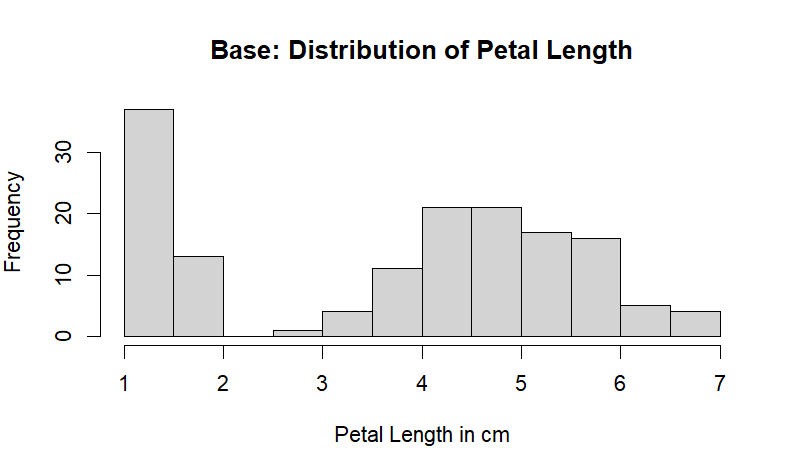
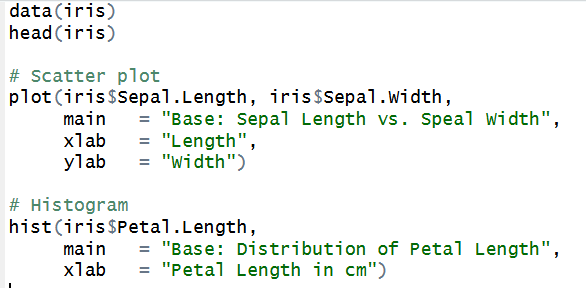
    For this assignment, we will be comparing three visualization systems in R: base graphics, lattice, and ggplot2. I’ll be using the built in dataset iris. 

    To start, using R’s base functions and graphics, I created a scatter plot comparing flower sepal length vs width. Then, a histogram showing the distribution of petal length.

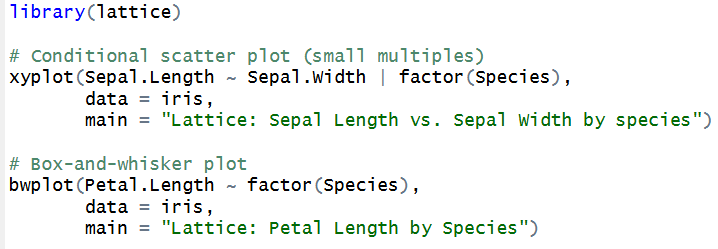
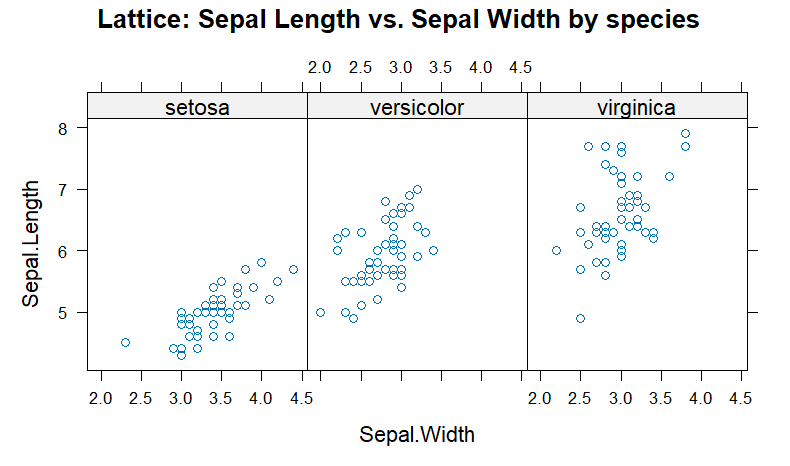
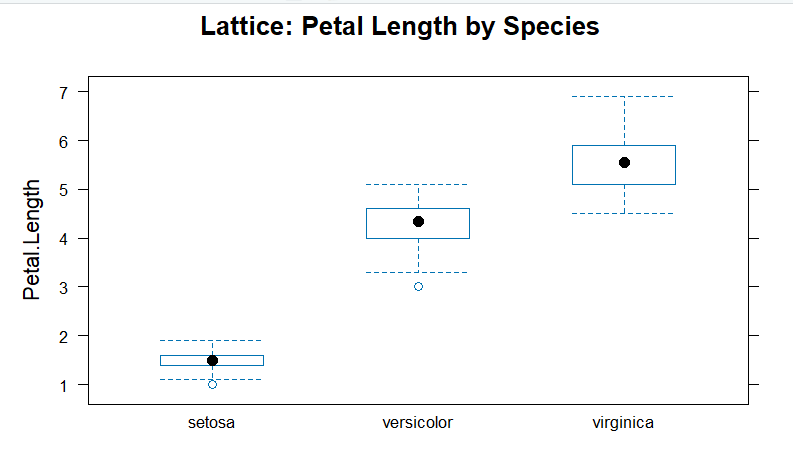
    Then, using the lattice package, we can compare sepal length and width by species using a conditional scatter plot. We can also look closer at the petal length distribution by grouping the data into species.

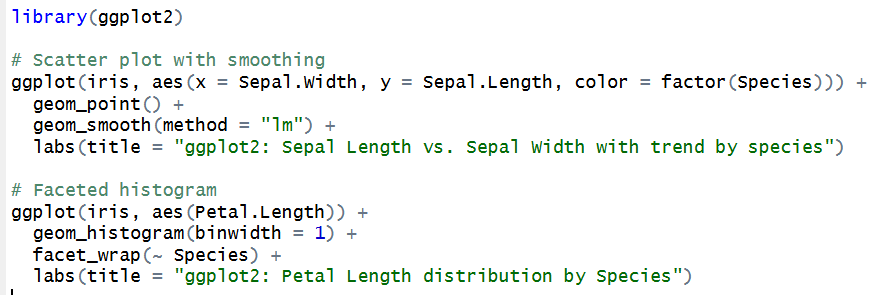
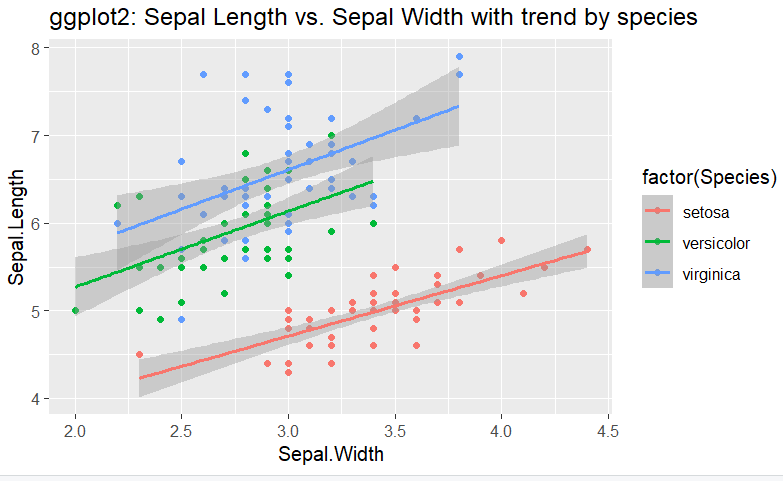
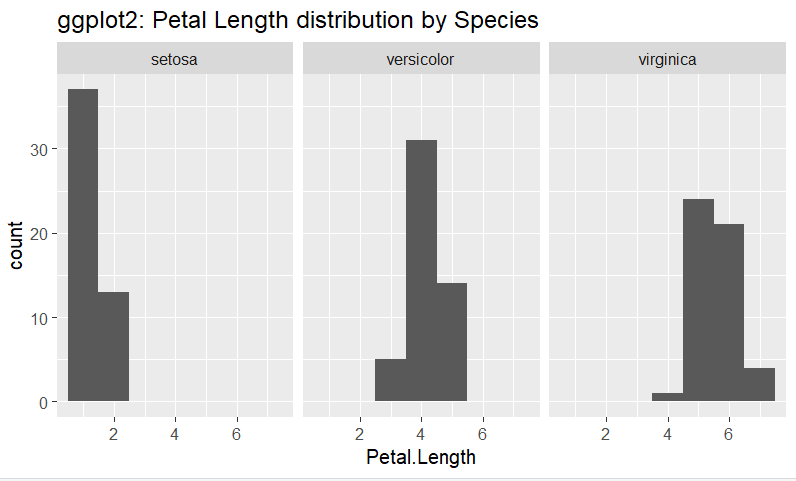
    Finally, using ggplot2, we can look even further at the relationship and patterns in the data between sepal length and width by species, and at petal length by species. 

    Between the base, lattice, and ggplot2, I think base has the most straightforward syntax, but the most basic results. I really liked both of the lattice visualizations and the ggplot2 scatter plot, and think they produced the most publication-quality output. Grouping by species allows for more insigts into patterns, and the visuals are clear and easy to understand. Both the lattice and ggplot2 syntax are more complicated than the base R, but overall they are still easy to understand, intuitive,  and not needlessly complex. However in terms of minimalism, the lattice code was the simplest with best results. I didn’t face any challenges when switching between any of the 3. 


    GitHub link here.

  • Assignment #8: Input/Output, String Manipulation, and the plyr Package

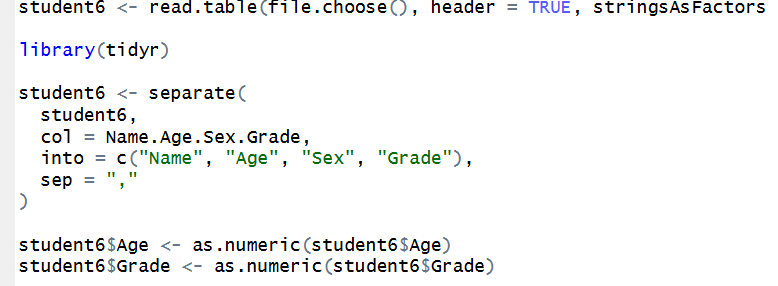
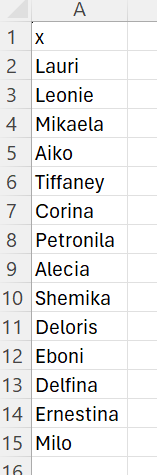
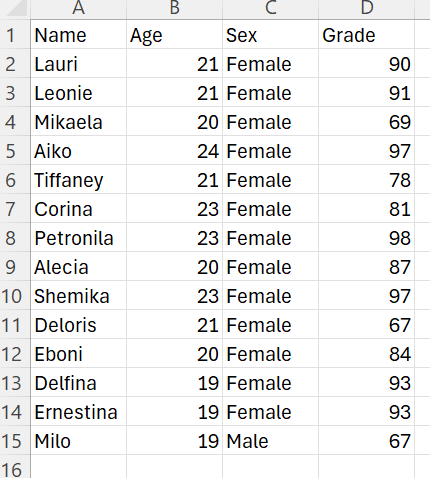
    To begin this assignment, I download and then upload the provided dataset into RStudio. Then, I separate the rows and convert rows Age and Grade into numeric data. 

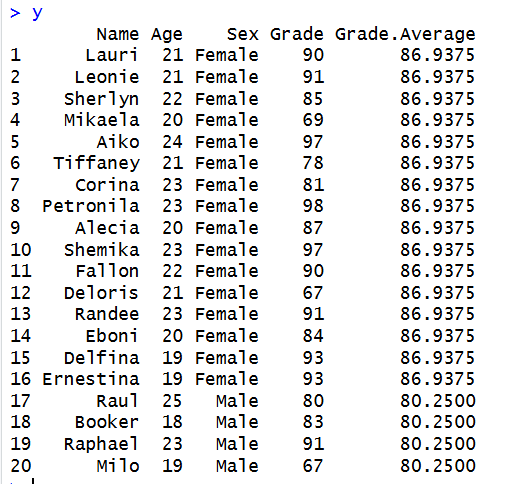
    Then, using the plyr package and dpply, we can compute the mean of Grade by Sex.

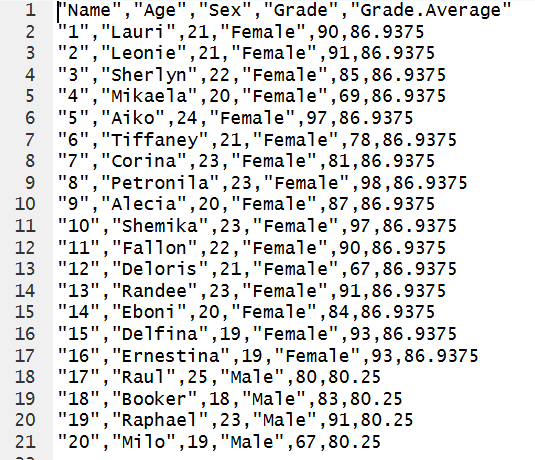
    Then, we write the grouped means to a text file:

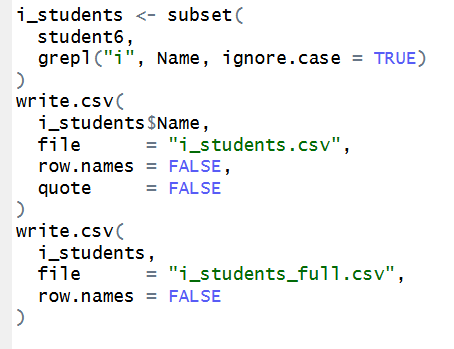
    Finally, we will filter our data, to create a subset of data with students whose name contains an “i”. Then, save as a csv with just the students names, and then one with their full data (including Age, Sex, and Grade).

    GitHub link here.

  • Assignment #7: Exploring R’s Object Oriented Systems 

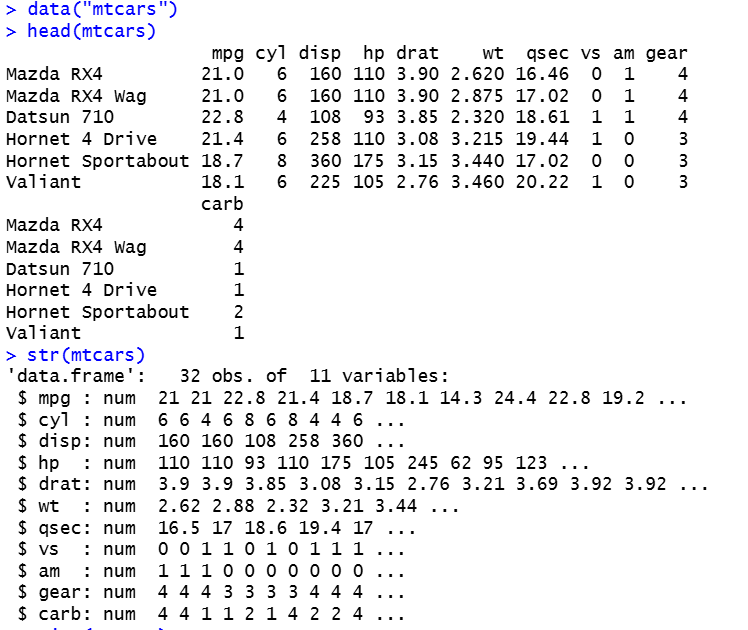
    I will be using Rs built in dataset mtcars for this assignment.

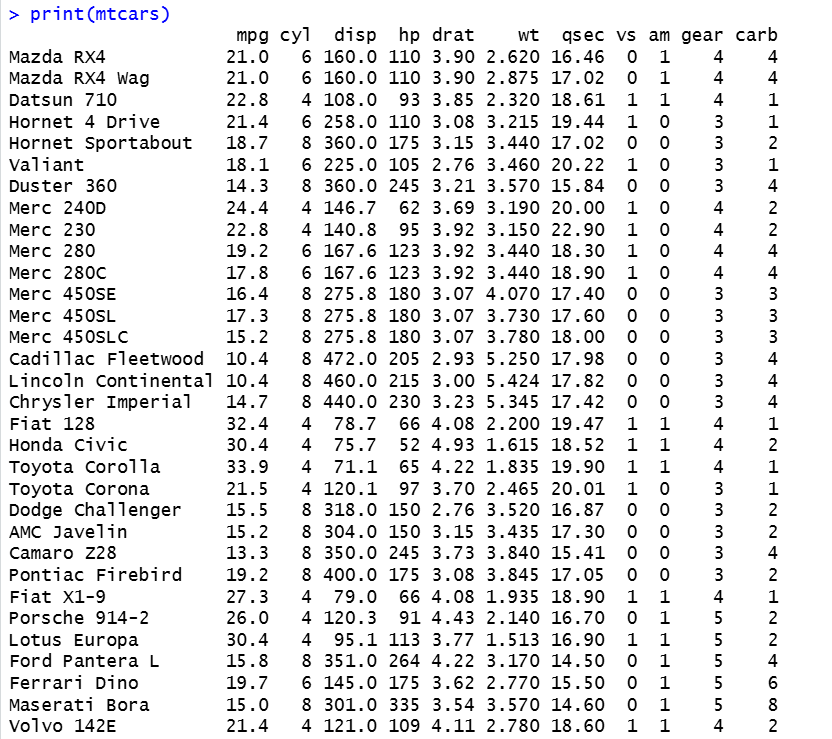
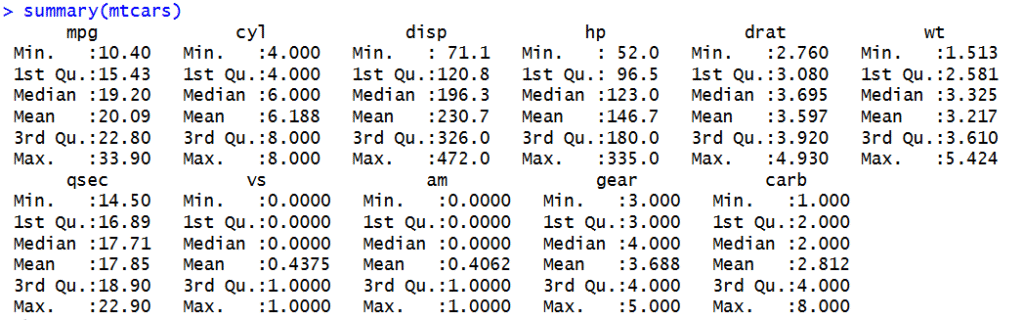
    To start, we can show the first few rows with head() and describe its structure with str(). Then, using generic functions print() and summary()we can further inspect the data.

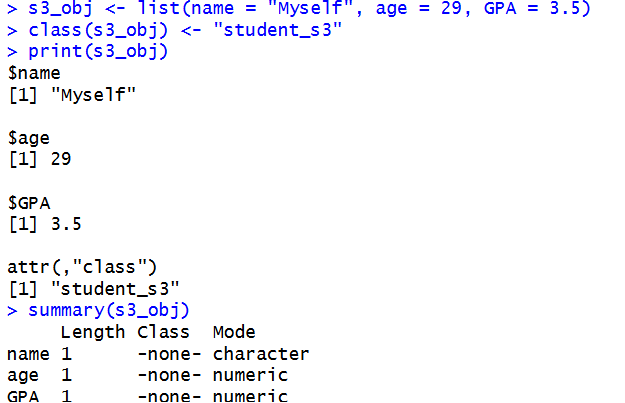
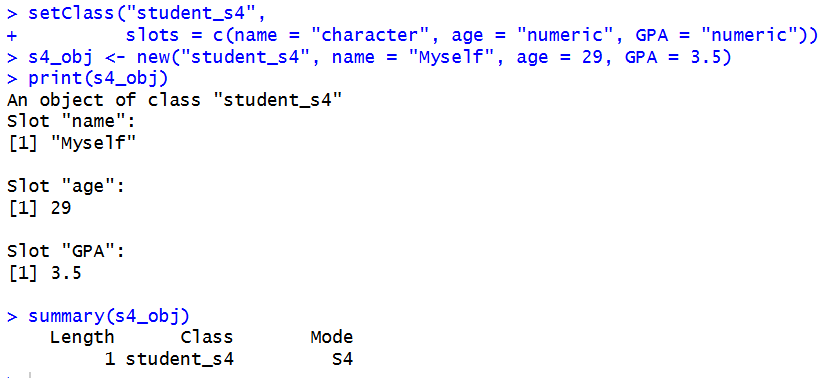
    Then, we will create 2 objects and inspect:

    You can tell whether an object uses S3 or S4 by using functions  class() and isS4(). The class() function tells us an object’s class, and isS4() checks whether it belongs to the S4 system. You can tell an object’s type by using typeof(), which returns its storage type. We can also use str() to examine its structure. Generic functions in R like these select a specific method based on an object’s class. The main difference between S3 and S4 is that S3 is simpler and more flexible, while S4 is more structured. S3 classes and methods are easier to create, but S4 requires you to define classes and methods using functions like setClass() and setMethod(). S4 also allows you to set specific data types for an object’s slots, which helps prevent errors.

    GitHub link

  • Assignment #6: Matrix Operations and Construction

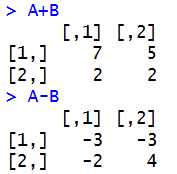
    To start, we will define matrices A and B, using matrix(). This function creates a dataset with rows and columns. Then compute addition and subtraction:

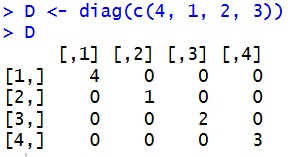
    Then, using diag() we will create a diagonal matrix.

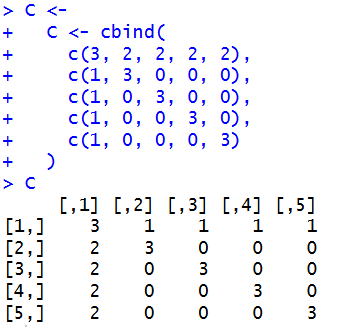
    Using  diag() with cbind(), which combines multiple matrices, data frames, or vectors together, we can construct a custom 5×5 matrix very simply.

  • Assignment #5: Matrix Algebra in R

    To start this assignment, we will create 2 matrices: 

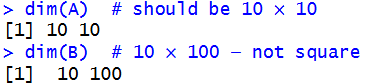
    Then, inspect to verify if they are square:

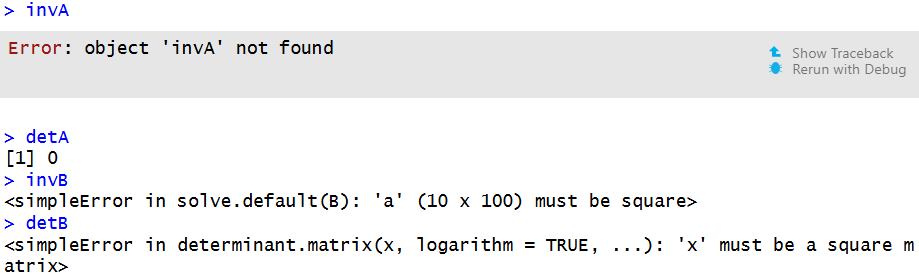
    We can see that A is square, and B is not. To handle errors for non-square or singular matrices, we can use solve() and det().The solve() function calculates the inverse of a matrix, given it is square and non-singular, and det()calculates the determinant of the square. 

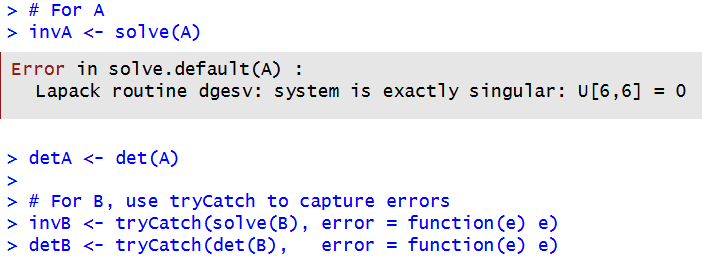
    Lets use them on A and B :

    When we try solve(A), we get an error message. This is because while A is square, it is singular. This means the inverse of the matrix cannot be calculated, this is also why det(A)returns 0. 

    For B, we used tryCatch to capture errors, and when we display them, there is also an error message. This is because B is not square, so it does not have an ordinary inverse. 

    A matrix must be square to have an ordinary inverse or determinant, but being square does not guarantee that an inverse exists. Matrix A is square but singular, which is why solve(A) cannot calculate an inverse and det(A) is 0. Matrix B is not square, so neither an ordinary inverse nor a determinant can be calculated. Since these matrices are relatively small, performance is not a major concern. However, with larger matrices or matrices that are close to being singular, numerical stability can become more important because small rounding errors can affect the results.

    GitHub: https://github.com/morgan8or/r-programming-assignments/blob/main/assignments/assignment-05/assignment_05.R

  • Assignment #4: Visualizing and Interpreting Hospital Patient Data

    In order to interpret relationships between patient vitals and physician assessments, we will create boxplots and histograms using R. 

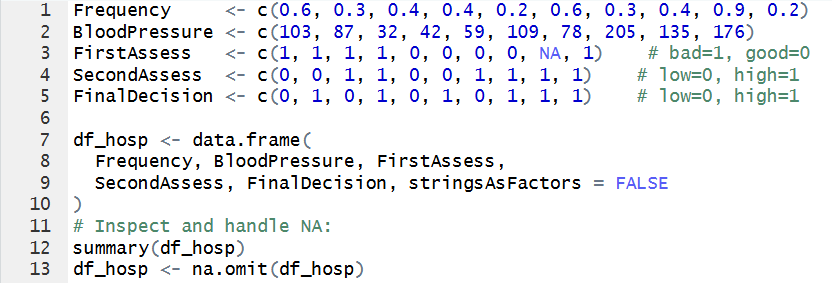
    To do this, we first need to define our vectors, add them to a dataset, convert categorical strings to numeric codes, and deal with NA’s:

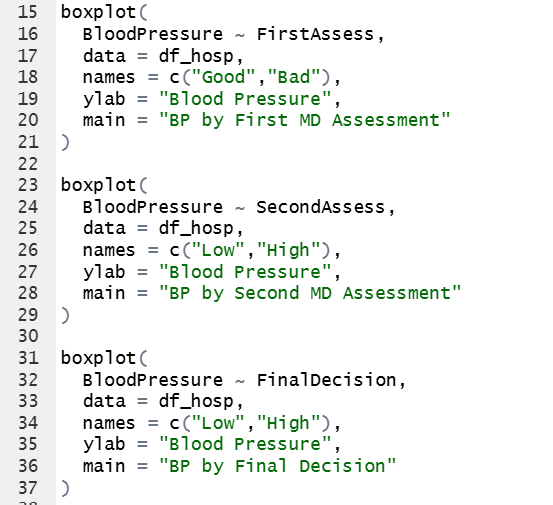
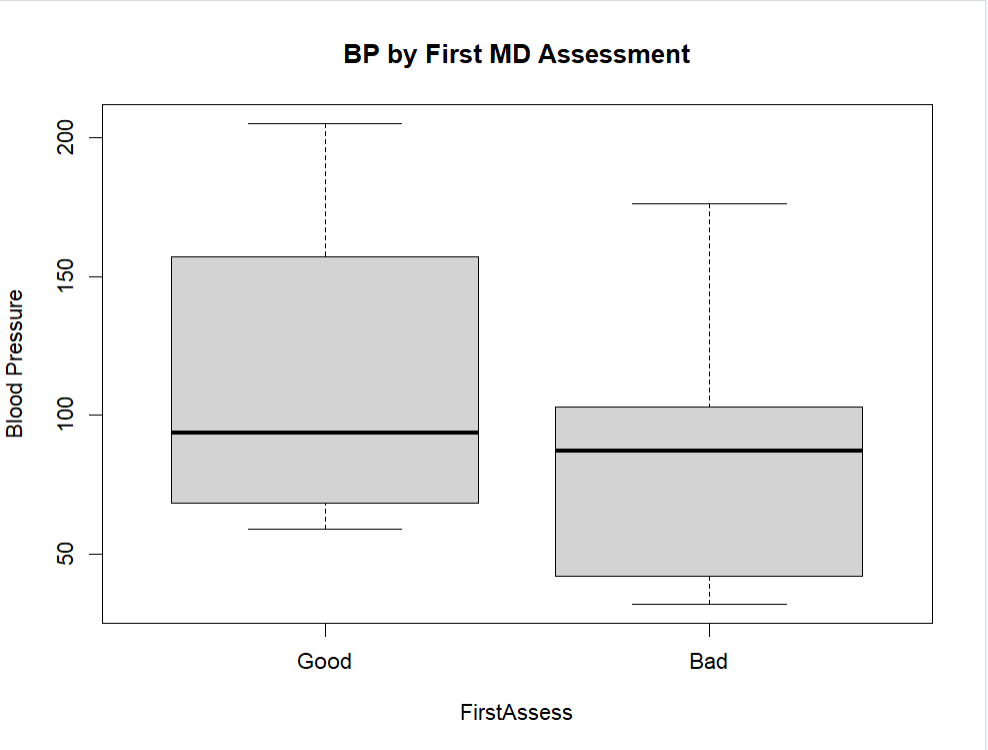
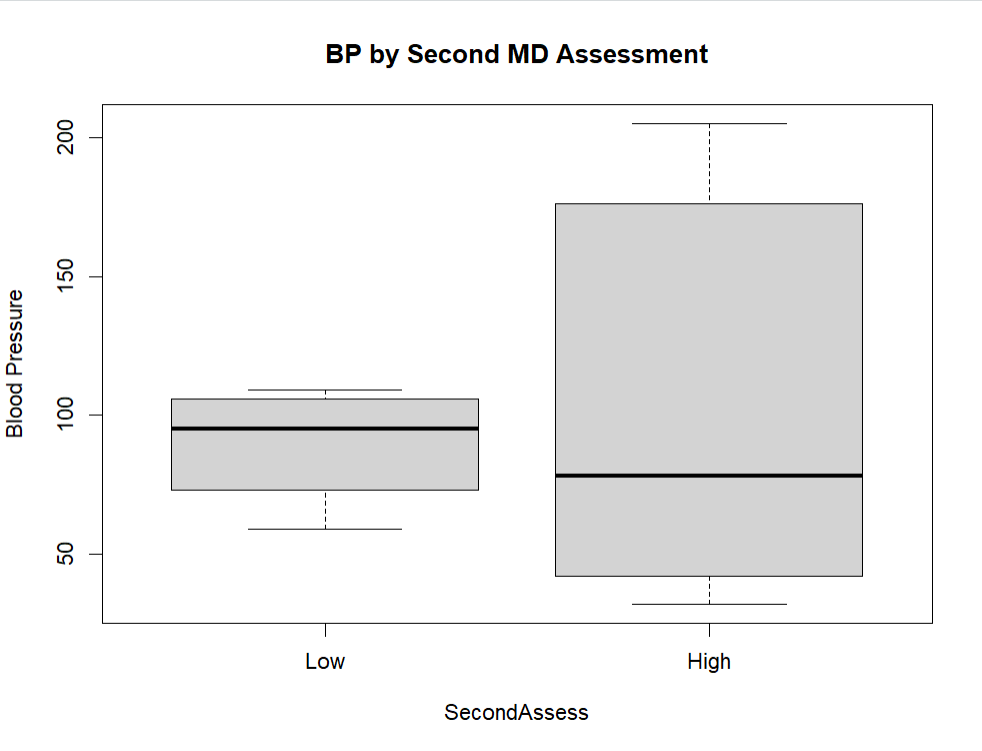
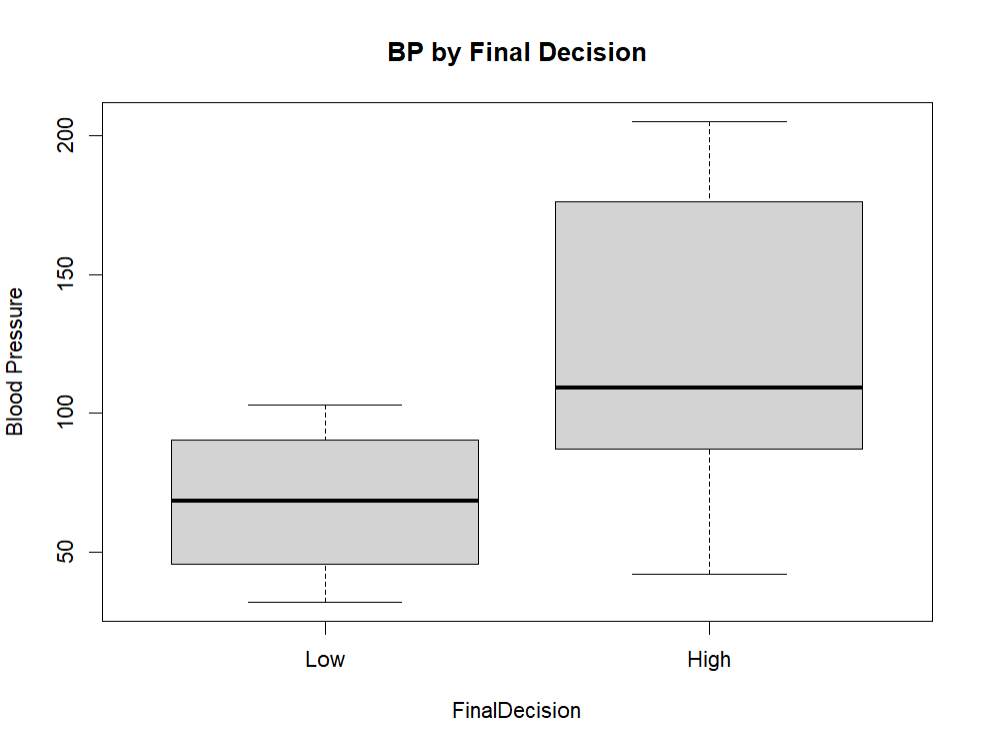
    Then, we create boxplots for blood pressure distributions by each assessment and final decision:

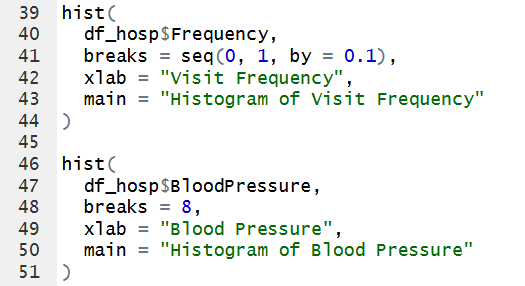
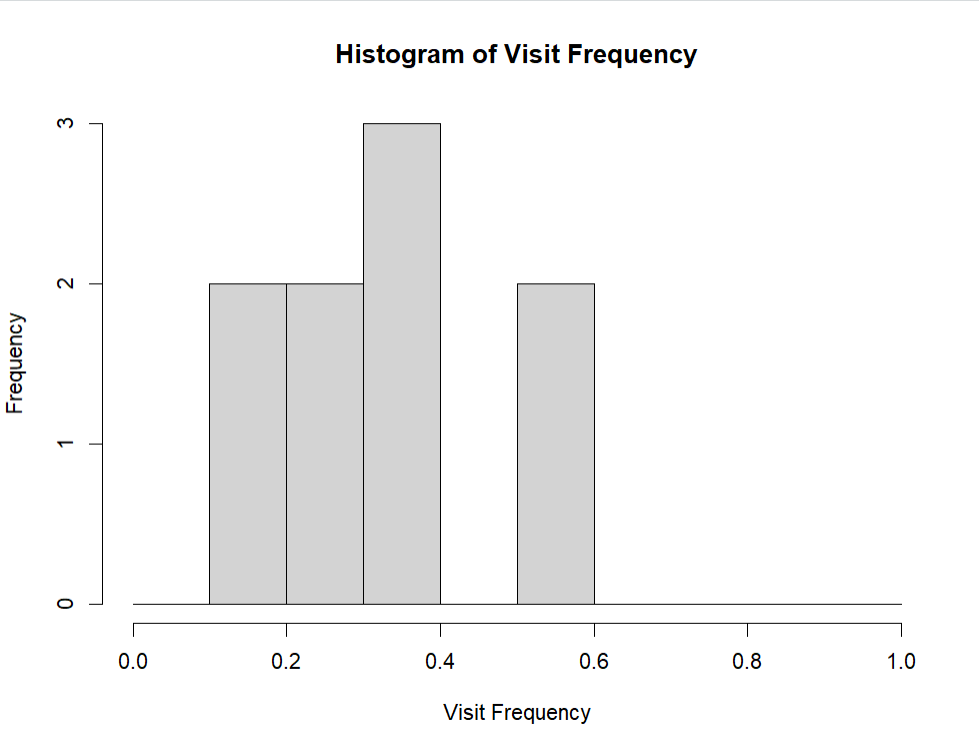
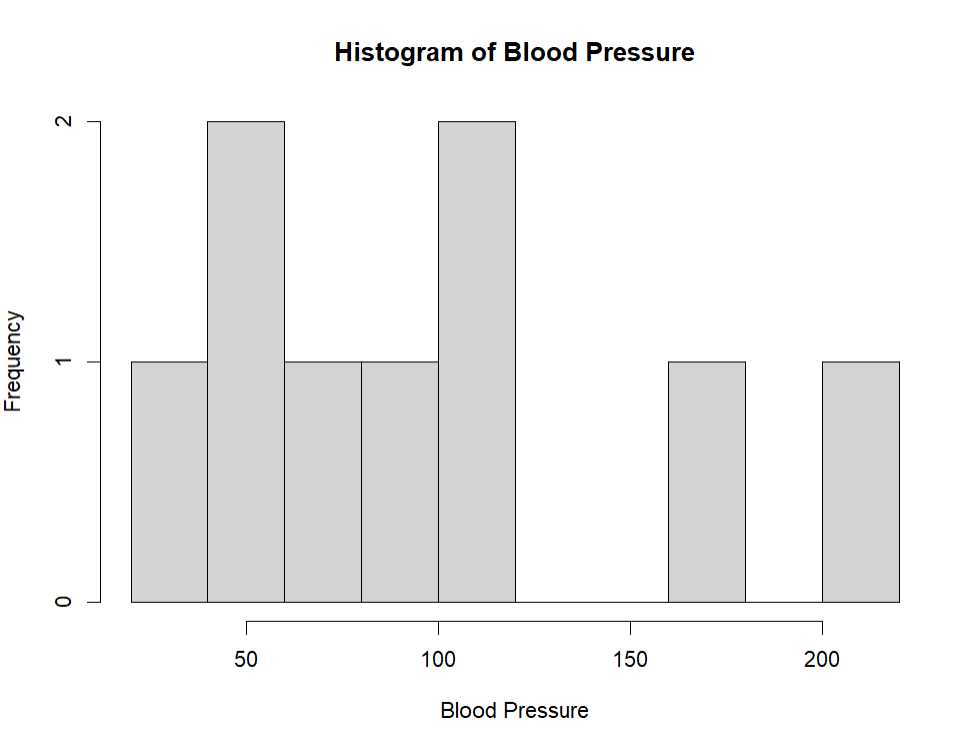
    We also create histograms for the distributions of frequency and blood pressure:

    Looking at the first assessment, the median blood pressure for the ‘good’ and ‘bad’ groups appears to be fairly similar. Additionally, the ‘good’ group seems to have slightly higher blood pressure values overall than the ‘bad’ group. For the second assessment, the ‘high’ group has a much wider range of blood pressure values, ranging from 32 to 205, compared with the ‘low’ group, which ranges from 42 to 103. Finally, the final decision seems most accurate, as the patients categorized as ‘high’ do seem to have higher blood pressure values overall compared with those categorized as ‘low’.

    Looking at the first histogram of visit frequency, there doesn’t seem t be any outliers, and the visit frequency ranges from 0.1 to 0.6, with the mode being 0.4. In the blood pressure histogram, most seem to be concentrated in between 32-109, with 2 outliers on the higher end at 176 and 205. 

    When dealing with the NA value, we just removed that patients entire data from our dataset. If it was still included, they may have caused outliers/skewing in the visualizations. For instance, their visit frequency was the highest, and would have been an outliers at 0.9. Additionally, their blood pressure was 135, which would have also caused the histogram to be skewed to the right alongside the other to higher outliers. 

    Overall, the data shows some differences in blood pressure levels among the patients, which could be important to consider in a clinical setting. However, the data we are using is made up, and should not be used in making clinical decisions. Out dataset is also small and limited, with only 10 patients. With a sample size this small, even if we were using real data, it should also not be used for medical judgement. Like we saw, just having a few outliers when the sample size is small could lead to a large skew in results. There is simply just not enough data to draw accurate conclusions. 
    GitHub link here.

  • Assignment #3: Analyzing 2016 data “Poll” Data in R

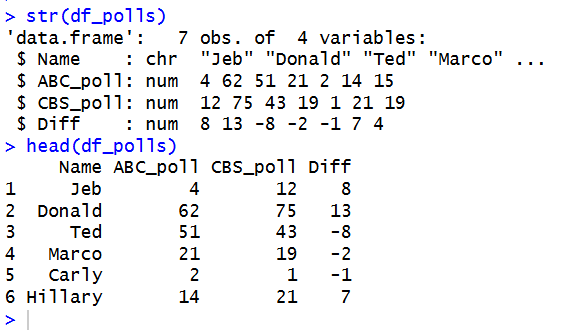
    To analyze ‘poll’ data in R, we start by defining out data, compiling it into a data frame. and then inspecting it:

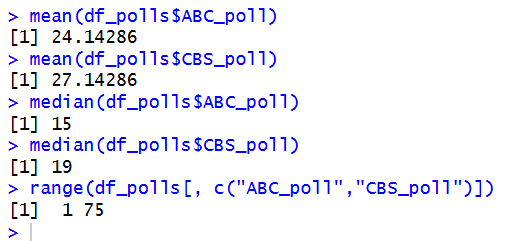
    Then, we find the mean, median, and range of each poll:

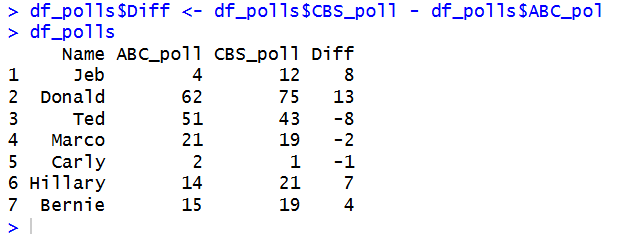
    And add a column for the difference between CBS and ABC:

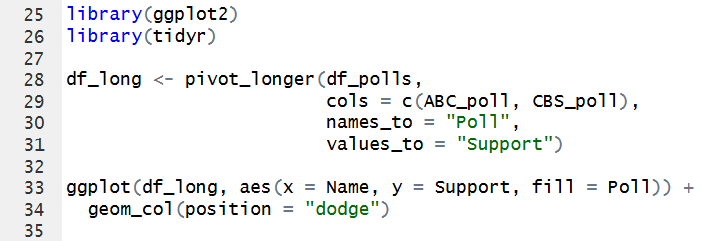
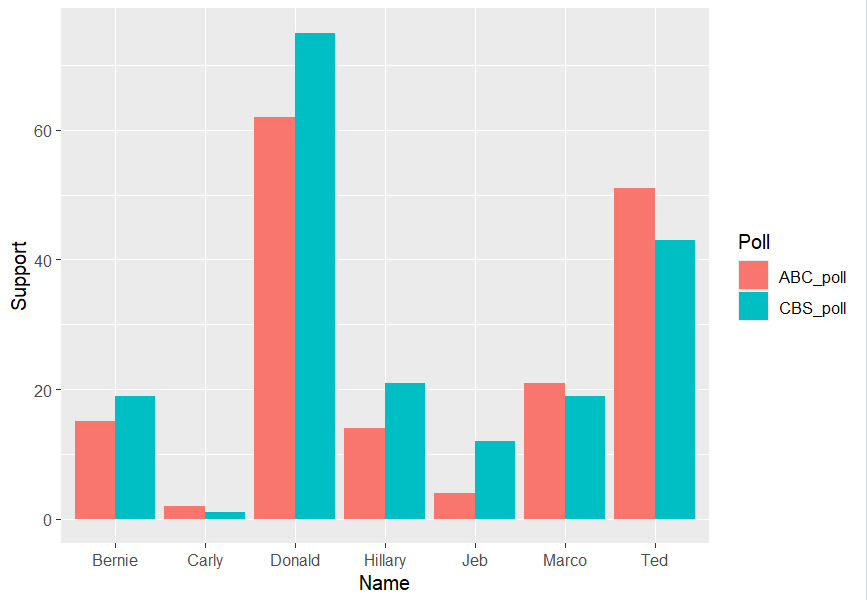
    Finally, we generate a plot to display and visualize the poll results and their differences:

    Looking at the poll data, the biggest differences between the ABC and CBS polls are for Donald, Jeb, and Ted. Donald has the largest difference at 13 points, with 62 in the ABC poll and 75 in the CBS poll. Jeb has a difference of 8 points, while Ted also has a difference of 8 points, but in the opposite direction. We can see that different polls can have noticeably different results for the same candidates.

    Using made up data can be limiting because it cannot lead to real or actual discoveries. It can be useful for showing possible patterns and helping us learn how to analyze data, but it does not provide the details that would come from real observations. To get real polling data, I would look for research organizations that collect and share polling information. Organizations such as the Gallup Poll and Pew Research Center provide real survey and polling data that can be used for analysis. I would also compare data from multiple reliable sources and check how the data was collected to make sure the results are accurate.

    Code chunk:
    Name <- c("Jeb", "Donald", "Ted", "Marco", "Carly", "Hillary", "Bernie")
    ABC_poll <- c( 4, 62, 51, 21, 2, 14, 15)
    CBS_poll <- c( 12, 75, 43, 19, 1, 21, 19)

    df_polls <- data.frame(Name, ABC_poll, CBS_poll)

    str(df_polls)
    head(df_polls)

    mean(df_polls$ABC_poll)
    mean(df_polls$CBS_poll)

    median(df_polls$ABC_poll)
    median(df_polls$CBS_poll)

    range(df_polls[, c("ABC_poll","CBS_poll")])

    df_polls$Diff <- df_polls$CBS_poll - df_polls$ABC_pol
    df_polls

    library(ggplot2)
    library(tidyr)

    df_long <- pivot_longer(df_polls,
    cols = c(ABC_poll, CBS_poll),
    names_to = "Poll",
    values_to = "Support")

    ggplot(df_long, aes(x = Name, y = Support, fill = Poll)) +
    geom_col(position = "dodge")
  • Module # 2 Assignment: Importing Data and Function Evaluation in R

    For this assignment, we are evaluating the myMean function using the vector assignment2, shown below.

    When running  myMean(assignment2), we get the error message:

    The error message states that ‘assignment‘ can not be found. This is because it does not exist! We created assignment2, and since the variable names are different, we must edit myMean to match. This is the same for someData, since we did not create a variable or vector with this name, it does not exist and is not defined. We need to correct the function.

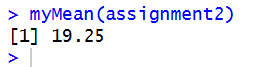
    Now that the variable names are correct, we can run the updated function myMean(assignment2), and get this output:

  • Assignment #1: Getting Started with R Programming 

    I already had RStudio installed on my computer, as I have taken courses that use it in the past. Since RStudio was already set up, I did not need to troubleshoot or resolve any installation problems.

    I am using Windows 11, with R version 4.5.1 and the latest version of RStudio, 2026.08.2. 

    Here is a screenshot of my console window, showing my current version:

    In R, a vector stores data sets and is fundamental to programming. Vectors come in different forms, including numeric, logical, and character vectors, among others. They are considered the basic building blocks of data in R and are used to store and work with collections of values. A majority of data manipulation is just interacting with vectors in different ways.